Run all your agents side by side.
TRD Workbench is a native macOS workspace for coding agents. Give Claude Code, Codex, and your dev servers each a pane, group them into workspaces, and watch the whole board from one window.
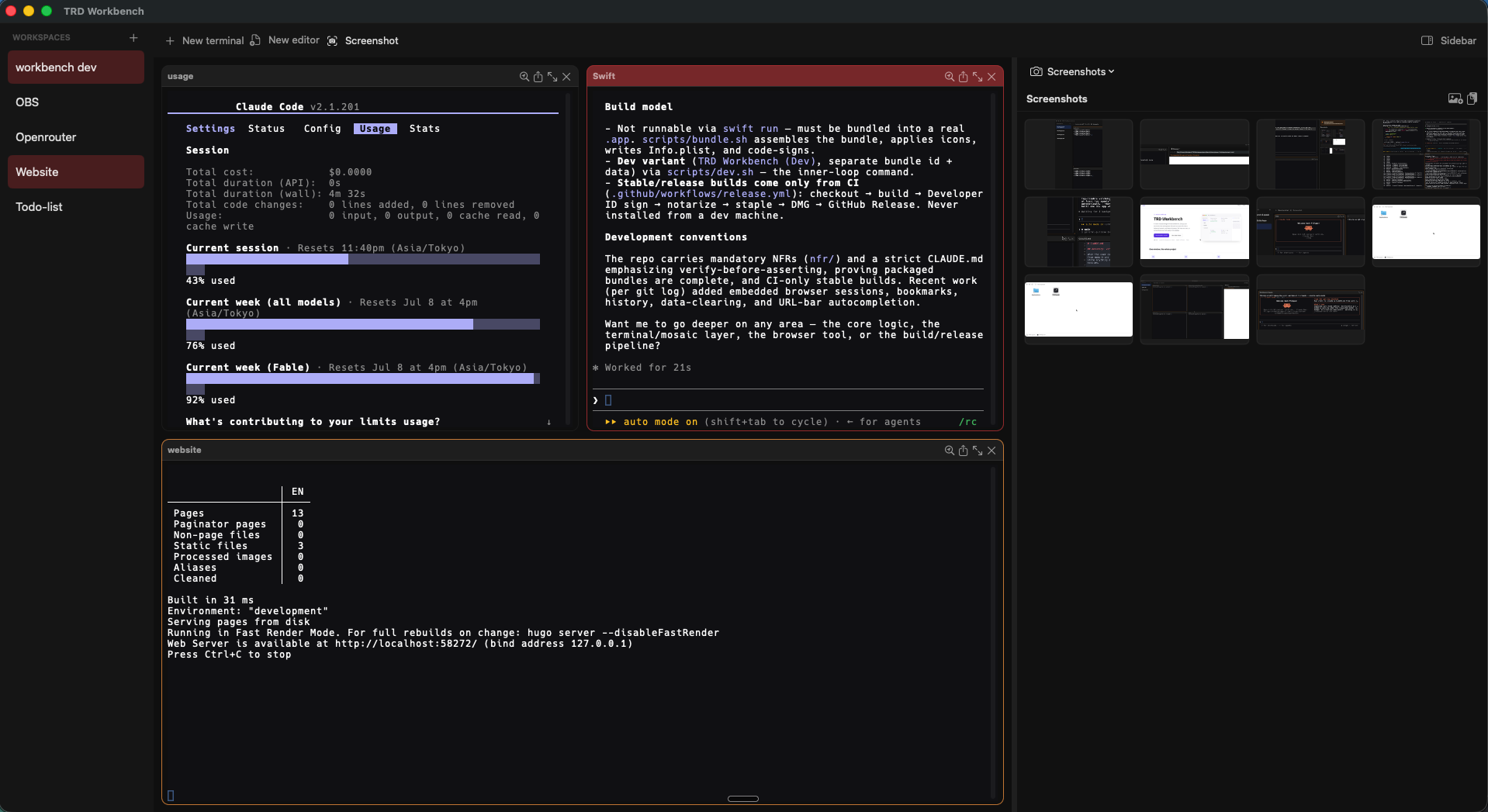
One window, the whole board
Workspaces down the left, a mosaic of terminals in the middle, and a tool on the right. Here: two agents and a Hugo dev server running at once, with the screenshots gallery open.
Each terminal is its own tile. Add one and the grid rebalances on its
own; no dragging splits, no window juggling. Clickable //localhost links open
in the built-in browser without leaving the app.
Built for running agents, not babysitting windows
Auto-tiling mosaic
Every terminal you open snaps into a balanced grid. Close one and the rest reflow to fill the space. Hit ⌘B to blow the focused pane up full-screen, and again to drop it back.
Workspaces with context
Group terminals by project in the left sidebar and switch with ⌘1–⌘9. Each workspace keeps its own environment variables, file-tree root, notes, and browser bookmarks, so changing task is one click.
Launchers
Save a named recipe of environment variables and startup commands, then spin up a preconfigured terminal in any folder. "Claude Code" and "Codex" come built in; add your own for the models and servers you run.
A tool beside every workspace
A right sidebar that changes with the job. Pick one per workspace.
A real browser pane next to your terminals. Click a localhost link in the output and the dev preview opens right here, with per-workspace bookmarks and history.
Browse the workspace's files without leaving the window. Right-click a folder to open a terminal or a launcher right there.
Set environment variables once for a workspace and every new terminal in it inherits them. No more re-exporting keys in every tab.
Grab a window or region with the macOS picker and keep the shots in a gallery. Per-shot picker means no standing screen-recording grant.
A scratchpad per workspace for the command you'll need again, the URL, the thing to remember. Plain text, always there.
Open a file as a tile alongside your terminals, with syntax highlighting for 14 languages and find. Quick edits without a context switch.
Knows when to nudge you
Start a long build or a coding agent, switch away, and the terminal turns red when the job goes quiet and wants you. The workspace row lights up too, so you can run several agents at once and only look when one needs a hand.
Genuinely native
SwiftUI and AppKit with SwiftTerm doing the terminal rendering. No Electron, no web wrapper. It's signed, notarized, and updates itself from a discreet box in the sidebar, on a stable or beta channel.
Get the workbench
Free, native, and notarized. macOS 14 Sonoma or later, Apple silicon. Still early, so expect rough edges and frequent updates.